
Backup and Disaster Recovery for Business Systems: RPO, RTO and the 3-2-1 Rule
A practical backup and disaster recovery plan for Egyptian companies: how to set RPO and RTO per system, apply the 3-2-1 rule, keep ransomware-proof copies, back up PostgreSQL with point-in-time recovery, and test restores on a schedule.
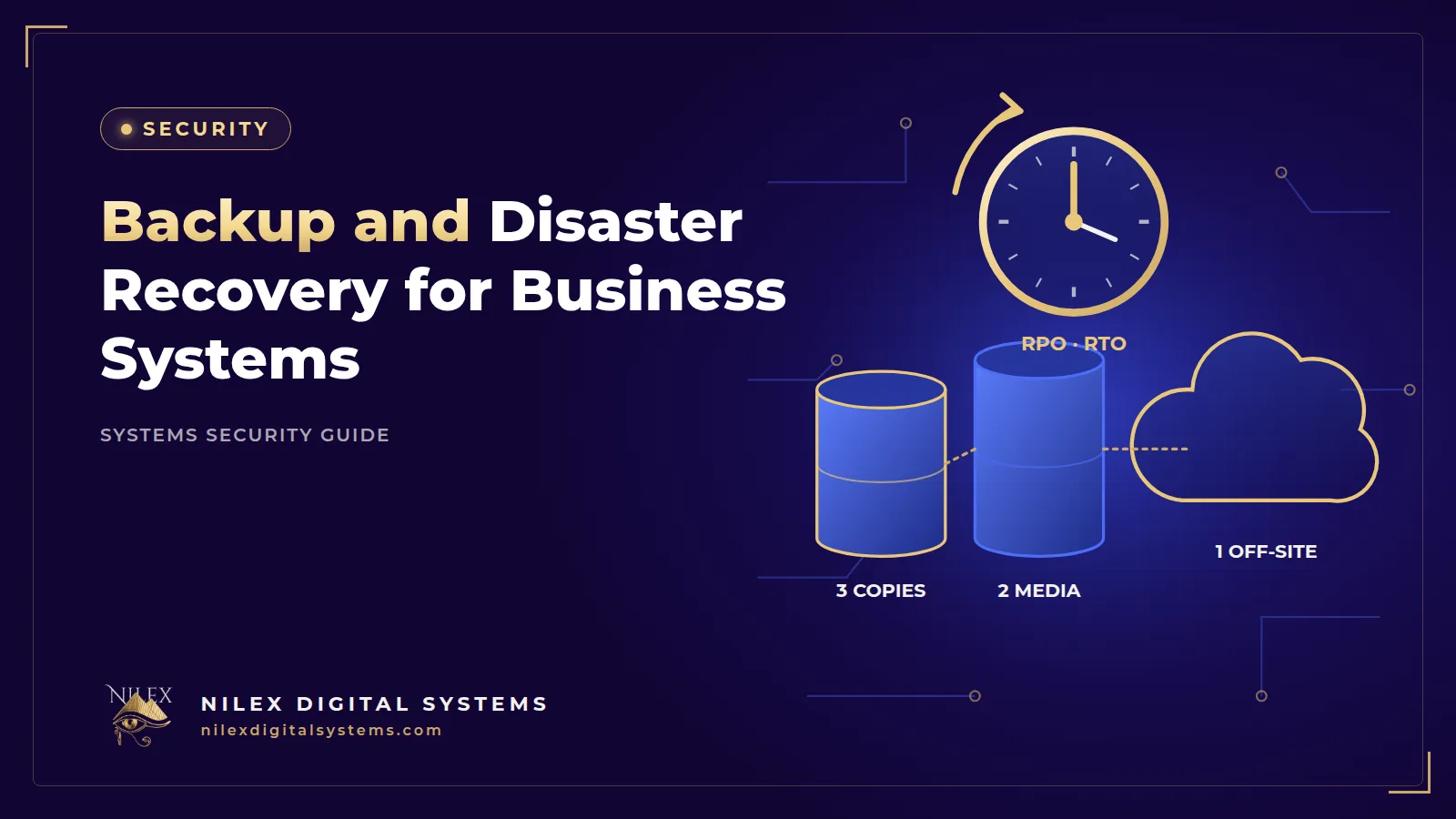
Every Egyptian company that runs on a system, whether an ERP for a factory in 10th of Ramadan, a CRM for a real estate broker in New Cairo or a clinic system in Alexandria, will one day face a bad morning: a failed disk, a deleted table, a ransomware note, a flooded server room or a hosting account that was suspended. The question is not whether you have "a backup". It is how much data you can afford to lose and how long you can afford to stop.
The short answer: a working backup and disaster recovery plan sets two targets for each system, the RPO (how much recent data you can lose) and the RTO (how long you can be down), keeps at least three copies of your data on two types of storage with one off-site (the 3-2-1 rule), protects one copy from deletion, and proves it all with regular test restores. This guide turns those ideas into a plan an owner can approve and an IT team can run.
Key takeaways
- RPO and RTO are business decisions: agree them with management per system before choosing any technology.
- Follow the 3-2-1 rule, and keep at least one copy offline or immutable so ransomware cannot delete it.
- Replication and RAID are not backups: they copy mistakes and deletions instantly.
- For PostgreSQL, combine regular dumps with continuous WAL archiving if you need point-in-time recovery.
- A backup you have not restored is a hope, not a plan. Test restores on a schedule and time them.
- Name one owner for backups and write the recovery steps down.
RPO and RTO in business terms
NIST's glossary, based on its contingency planning guide SP 800-34 Rev. 1, defines the recovery point objective as "the point in time to which data must be recovered after an outage", and the recovery time objective as the length of time a system can be in recovery "before negatively impacting the organization's mission or mission/business processes".
In plain terms:
- RPO answers "how much work can we redo?" If you back up every night at 2 a.m. and the server fails at 5 p.m., you lose a full day of invoices, orders and stock movements. Your RPO is 24 hours whether you meant it or not.
- RTO answers "how long can we wait?" A distributor in the Delta whose sales reps cannot create orders loses sales every hour. A back-office HR system can often wait longer.
Example targets by system
The table below shows illustrative targets for a mid-sized Egyptian company. They are examples to start a discussion, not standards; set your own with management based on what an hour of downtime or a lost day of data really costs.
| System | Example RPO | Example RTO | Why |
|---|---|---|---|
| ERP and accounting (with e-invoicing) | Minutes | A few hours | Invoices, stock and payments are hard to re-enter |
| Online store and payments | Minutes | 1 to 4 hours | Lost orders and paid transactions without records |
| CRM and sales pipeline | A few hours | Same business day | Leads and follow-ups can be rebuilt partly |
| Company website | 1 day | 1 day | Content changes rarely |
| HR and payroll | 1 day | 1 to 2 days | Critical near payday, less so mid-month |
Shorter targets cost more: more frequent backups, standby servers and more testing. That trade-off is exactly what management should decide.
Backup, replication and disaster recovery are different things
- Backup is a separate copy of data you can go back to, ideally with several versions over time.
- Replication and RAID keep a second copy in sync for availability. If someone deletes customers or ransomware encrypts files, the change reaches the copy too.
- Disaster recovery (DR) is the whole plan to bring the service back: servers, database, uploaded files, configuration, domain and DNS, certificates, integrations and the people who do the work.
A company can have perfect database backups and still be down for a week because nobody knows how to rebuild the server, where the e-invoice signing setup lives, or who holds the domain password.
The 3-2-1 rule and copies ransomware cannot reach
The US Cybersecurity and Infrastructure Security Agency (CISA) explains the 3-2-1 rule in its backup guidance for small and medium businesses: keep 3 copies of important files, on 2 different types of storage media (for example a hard drive and the cloud), with 1 copy off-site. It also advises automating backups, testing restores and training staff, because "a backup plan is only helpful if everyone knows how to use it."
Offline or immutable copies
Ransomware groups look for backups first. CISA's #StopRansomware Guide (2023 update) advises to "maintain offline, encrypted backups of critical data, and regularly test the availability and integrity of backups", because "many ransomware variants attempt to find and subsequently delete or encrypt accessible backups". Practical options:
- Immutable cloud storage. For example, Amazon S3 Object Lock uses a write-once-read-many model. In its compliance mode, AWS documentation says a protected object version "can't be overwritten or deleted by any user, including the root user" during the retention period. It requires versioning on the bucket.
- Offline media such as a rotated external disk that is disconnected and stored in another location, with encryption.
- Separate credentials. The server that creates backups should not hold the keys to delete old ones, and backup accounts need multi-factor authentication.
Our guide to ransomware protection and recovery covers the rest of the defence.
Backing up PostgreSQL and the rest of the system
Logical dumps with pg_dump
The PostgreSQL documentation for pg_dump states that it "makes consistent exports even if the database is being used concurrently" and "does not block other users". The custom format (pg_dump -Fc mydb > db.dump) is compressed and restored with pg_restore. Note that pg_dump covers a single database: roles and other cluster-wide objects need pg_dumpall. Dumps are simple and portable, but you can only restore to the moment each dump was taken.
Point-in-time recovery with WAL archiving
When the RPO is minutes, use continuous archiving. According to the PostgreSQL 18 documentation on continuous archiving, you combine a base backup (the easiest tool is pg_basebackup) with archived WAL (write-ahead log) files, enabled with wal_level set to replica or higher, archive_mode = on and an archive_command or archive_library. This makes it "possible to restore the database to its state at any time since your base backup was taken", for example to 10:41, one minute before someone ran a wrong update on the price list.
Managed database services on cloud platforms offer automated backups and point-in-time restore as settings. Check the retention period, the region where copies are stored, and whether copies survive if the database is deleted.
Do not forget the rest
- Uploaded files: invoices, product images, patient attachments, contracts.
- Application code (in Git) and the exact build and deployment steps.
- Server configuration: Nginx, process manager, firewall rules, scheduled jobs.
- Secrets: environment files and integration keys, stored encrypted in a password manager or secret store, not beside the backups in plain text.
- Domain, DNS and certificate access, and the contacts for your hosting provider and payment gateway.
Test restores and measure the real RTO
Most failed recoveries fail at the restore step: the backup job ran but produced empty files, the encryption key was lost, or nobody had ever rebuilt the server. A simple routine:
- Monthly: restore the latest database backup to a separate test server and check record counts and a few recent invoices.
- Quarterly: run a full drill: rebuild the application from scratch on a new server using only the written runbook and the backups, and time it. That time is your real RTO.
- After major changes: new modules, a database upgrade or a hosting move.
- Every day: alerts when a backup job fails or its size changes sharply.
Record each test: date, who ran it, what was restored, how long it took and what went wrong.
Planning for Egyptian realities: power, internet and people
- On-premise servers: a server in the office in Nasr City or the factory needs a UPS sized for a safe shutdown, cooling and a lockable room. Keep at least one copy outside the building.
- Internet outages: if staff work on a cloud system, a second line from a different provider or a mobile data router keeps sales and cashier teams working.
- Hosting account risk: an unpaid invoice or a lost password can lock you out of everything. Keep an off-site copy under a separate account the company controls.
- People: name a backup owner and a deputy, and write down who decides to start recovery and who informs customers.
Legal duties when data is lost or exposed
If an incident affects personal data, Egypt's Personal Data Protection Law 151/2020 requires notifying the Personal Data Protection Center within 72 hours of becoming aware of a breach; see our guide to breach notification within 72 hours. Under Anti-Cyber and IT Crimes Law 175/2018, Article 35 penalises the person who actually manages a legal entity if they fail to report a crime affecting its information systems to the competent authorities; see our explainer on Law 175 of 2018 for companies. Your DR plan should include who makes these calls.
Backup and disaster recovery checklist
| Item | Owner | How often |
|---|---|---|
| RPO and RTO agreed per system and signed off | Management and IT | Yearly |
| Automated database backups, with point-in-time recovery where RPO is minutes | IT / developer | Continuous / daily |
| Uploaded files and configuration backed up | IT | Daily |
| 3 copies, 2 media types, 1 off-site | IT | Checked monthly |
| One offline or immutable copy, encrypted | IT | Checked monthly |
| Backup failure alerts working | IT | Daily |
| Test restore of database | IT | Monthly |
| Full recovery drill with timed RTO | IT and system owner | Quarterly |
| Written runbook, contacts and access list stored off-site | IT manager | Updated after changes |
Backups are one part of a broader plan; see our 90-day cybersecurity plan for Egyptian SMEs and the guide to securing a Linux server.
How Nilex helps
Nilex builds business systems on PostgreSQL and can host them on cloud infrastructure such as AWS. For clients who need it, we set up automated database and file backups, off-site and immutable copies, backup monitoring, a written recovery runbook and scheduled restore tests. For larger multi-branch deployments, recovery targets are best agreed when scoping an Enterprise ERP package, and we can also review the backup setup of a system you already run.
Frequently asked questions
What is the difference between RPO and RTO?
RPO is how much data you can afford to lose, measured back from the moment of failure. RTO is how long the system can be down before the business is harmed. A nightly backup gives an RPO of up to 24 hours regardless of how fast you restore.
What is the 3-2-1 backup rule?
Keep three copies of important data, on two different types of storage, with one copy off-site. CISA recommends it for small and medium businesses, and adding one offline or immutable copy protects against ransomware.
Is cloud hosting a backup?
No. Cloud servers can fail, be deleted, or be encrypted by ransomware like any other server. You still need separate backups, preferably in a different account and with protection against deletion.
How often should we test our backups?
Restore a database backup at least monthly, and run a full timed recovery drill at least quarterly and after major changes. Automated alerts should tell you every day if a backup job failed.
Is RAID or database replication enough?
No. They protect against hardware failure but copy deletions, corruption and encryption to the second copy immediately. You need versioned backups you can go back to.
Not sure your company could recover from a failed server or ransomware? Ask for a backup and recovery review or a free consultation through our contact page.
 Cybersecurity for Egyptian SMEs: A Practical 90-Day Plan26 September 2026 · 10 min
 Ransomware Protection for Egyptian Companies: Prevent, Contain and Recover26 September 2026 · 9 min
 Phishing and Fake Payment Requests: Protecting Egyptian Businesses from Email and WhatsApp Scams26 September 2026 · 10 min