
SEO for a Large Catalogue: Book, Author and Category Pages That Google Can Find
How the Dar El Ahram legal bookshop is structured for Google: a page for each of 800+ books, 340+ authors and 19 legal branches, plus articles and events, each with its own title, description, address and share image.
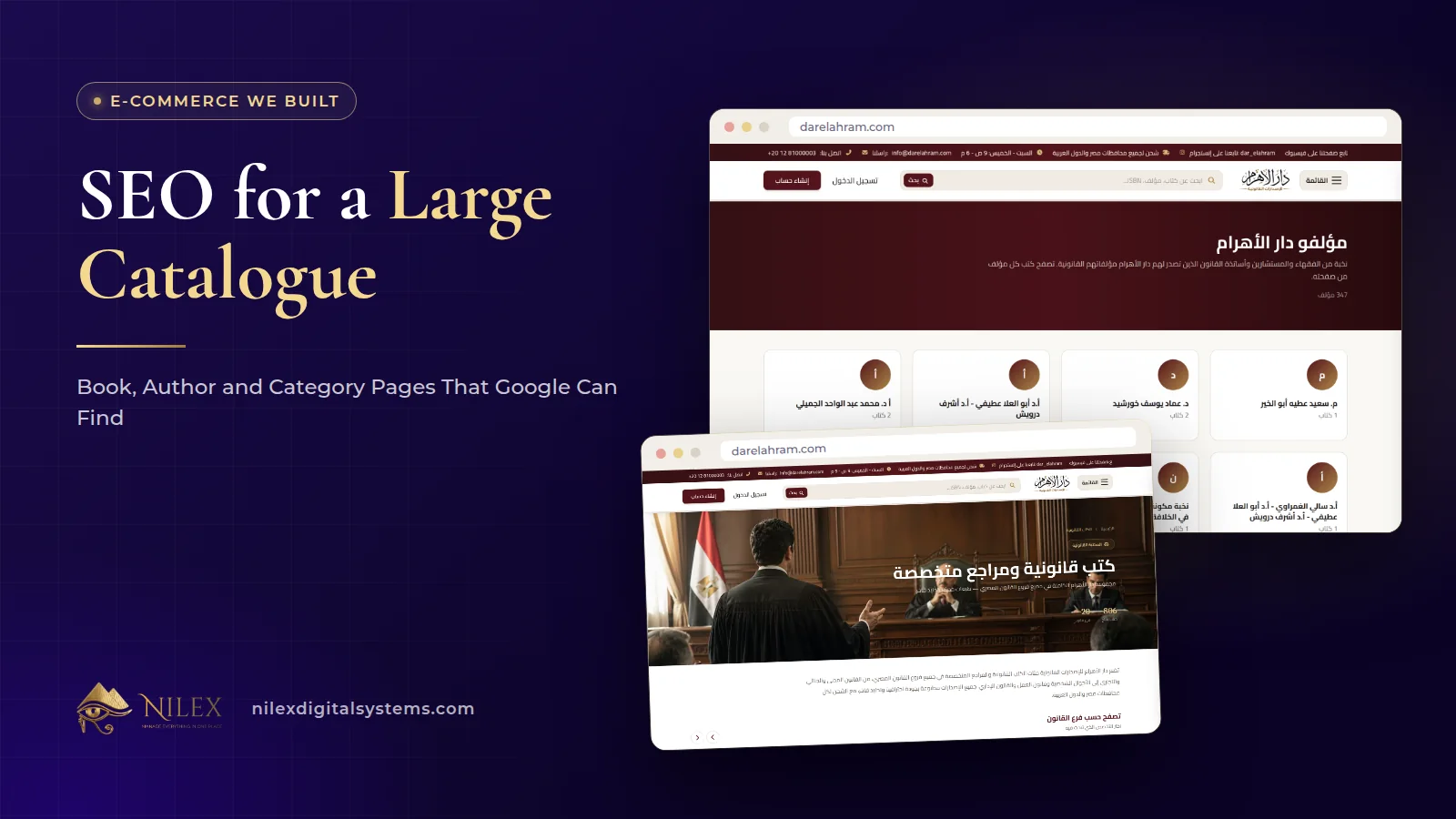
A large catalogue is found on Google when every item, every grouping and every useful topic has its own page that answers one search well. On the Dar El Ahram legal bookshop that means a page for each of more than 800 books, more than 340 authors and 19 legal branches, plus articles and events, and each page carries its own title, description, address and share image.
Before the project, nothing about Dar El Ahram's catalogue could be found on Google. This article explains how we structured it so that a lawyer searching for a reference, an author or a branch of law can land straight on the right page, and which of those principles apply to any business with hundreds of products. The full project is in the Dar El Ahram online bookshop case study.
Key takeaways
- Each kind of search needs its own kind of page: a book page for a title, an author page for a jurist, a branch page for a field of law.
- Every page has its own title, description, address and share image. That is what lets 800+ pages compete separately instead of as one shop.
- Pages are rendered on the server, so search engines receive the full content, not an empty shell.
- Structured data, an XML sitemap that updates itself and Google Search Console connected at launch tell Google what exists and help it find new pages.
- Internal links connect books, authors, branches and articles, so authority flows across the whole catalogue.
Why every search needs its own page
People search for a large catalogue in different ways. One lawyer types the name of a book. Another types the name of a jurist he trusts. A student types the name of a branch of law plus the word "books". A reader with a question types the question itself. One long product list cannot rank for all of those. Separate pages can, because each one can be written, titled and described for exactly one of those searches.
That is the same principle we explain for company websites in company website pages that rank: one page per topic beats one long page. In a catalogue the topics are the products, the groupings and the questions around them.
The page types in the Dar El Ahram catalogue
| Page type | How many | The search it answers | What links to it |
|---|---|---|---|
| Book page | 800+ | A specific title or a specific topic | Branch pages, author pages, the books page, articles |
| Author page | 340+ | A jurist's name, often with "books" | Each of the author's book pages and the authors list |
| Legal branch page | 19 | A field of law, such as books on a given branch | The home page and the books page filters |
| Article | Growing | A legal question or topic | The blog, related and recent articles |
| Event page | Per event | A book fair or event by name | The events list and the home page |
| Questions section | One section, filtered by question type | Common legal questions on a topic | Its own page on the site |
The latest releases and offers pages complete the set: they give returning readers and search engines a place where new and discounted titles appear first.
Book pages
Each book page carries the book, its author and reader reviews. The author link keeps both the reader and search engines moving through the catalogue instead of hitting a dead end. Reader reviews add text written by real buyers, which helps a page answer more than the title alone.
Author pages
Lawyers often search by jurist. An author page gathers that author's books in one place and gives Google a clear page for the name. With more than 340 authors, these pages form a large part of what the store can rank for.
Legal branch pages
The 19 legal branches are the store's categories. Each has its own page listing its books. Categories are usually the strongest pages in a store, because they match broad searches and link down to many products. We cover category design in general in product categories, brands and filters.
The four things every page carries
SEO on this store covers the whole catalogue, not only the home page. Every book, author, category and article page carries:
- Its own title, written for the search that page answers.
- Its own description, the text Google often shows under the title.
- Its own address, a stable URL for that page alone.
- Its own share image. For books this is a compressed version of the cover, so a link shared on WhatsApp or Facebook shows the book and loads quickly.
With hundreds of pages, these cannot depend on someone writing them by hand one by one. On a catalogue this size they should come from the data already entered for each item, such as the book's title and author, the author's name and photo or the branch name, so that every new page arrives with them in place and none is left with a blank or duplicated title.
The technical foundations: rendering, structured data and sitemaps
Pages rendered on the server
The store is built with Angular with server-side rendering. When Google, or a link preview on a social network, requests a page, it receives the full HTML with the title, description and content already inside. A catalogue that only appears after scripts run in the browser is harder for search engines to read reliably.
Structured data
Pages carry structured data, the machine-readable description that tells search engines what a page is about. The schema.org vocabulary has types for books, people, articles and events, which suits a publisher's catalogue well. For product stores we explain structured data in more depth in e-commerce SEO and structured data.
A sitemap that keeps itself up to date
The XML sitemap lists the store's pages and updates itself as books, authors and articles are added, so there is no list to maintain by hand. Google Search Console was connected at launch, which is where the publisher can see which pages are indexed and which searches bring readers. Our Google Search Console guide explains the reports that matter.
How the pages link to each other
A large catalogue only works for SEO if its pages are connected. On Dar El Ahram the links run in every direction:
- Books link to their author.
- Authors link to all their books.
- Branch pages list their books, and the books page filters by branch and author.
- Article pages show related and recent articles and books, so content leads to the catalogue.
- The home page brings together featured books, authors, branches, articles, offers and events.
The result is that every book can be reached in several ways, through its branch, its author and the books page, which is what helps search engines discover and revisit a large catalogue.
Content that brings searches the catalogue cannot
Many legal searches are questions, not titles. The store's articles, its questions section and its event pages answer those searches and bring readers to the site, where the catalogue is close at hand. Signed-in readers can also submit articles from their profile; the team approves or rejects each one before it is published, which keeps quality under control. We describe these features in the publisher website beyond the store, and the AI assistant that answers questions in conversation in the AI book assistant case study.
Keeping a large catalogue clean
A catalogue changes every week. The dashboard lets the team show or hide a book on the public site, and delete a book and restore it if that was a mistake, which is safer than losing a page that was ranking. Some general rules for any large catalogue:
- Keep the page of a title that is temporarily out of stock and say so, rather than deleting a page that brings visitors.
- Keep addresses stable. If a page must move, plan a redirect, as we explain in website redesign without losing SEO.
- Avoid near-identical pages. Two books with the same description compete with each other.
- Check Search Console regularly for pages that are not indexed and fix the reason.
How Nilex helps
We build stores and websites where SEO covers every page, with server rendering, structured data, an XML sitemap and Google Search Console set up at launch. If you have hundreds of products, titles or services, these are the next steps:
- See the project summary on the Dar El Ahram client page.
- Read about our SEO business website service and our e-commerce store development service; packages are listed on each page.
- Send us your catalogue or your current site through the contact page and we will reply with how we would structure it.
Frequently asked questions
Why give every author their own page?
Because readers search by author. An author page gives Google one clear page for that name, gathers the author's books and links to each of them. Dar El Ahram has more than 340 such pages.
Do hundreds of page titles have to be written by hand?
They should not have to be. On a large catalogue the title, description, address and share image are best built from the data entered for each item, with the option to refine the important pages by hand, so no new page goes live without them.
What does a self-updating sitemap do?
It lists the store's pages and adds new books, authors and articles as they are published, so Google can discover them without anyone editing a file.
Are category pages more important than product pages?
Both matter. Category pages match broad searches and link to many products; product pages match specific searches. A large catalogue needs both, linked to each other.
How soon do pages appear on Google?
It varies by site and by page, and no one can promise a date. Connecting Search Console at launch and submitting the sitemap lets you see indexing progress and fix problems early.
 Content at Scale: How Our Clients' Websites Publish Hundreds of Articles That Bring Visitors11 October 2026 · 10 min
 Company Website Pages That Rank: What Each Page Needs to Bring Visitors and Enquiries5 October 2026 · 7 min
 Website Speed and Core Web Vitals Explained for Business Owners5 October 2026 · 7 min