
Running Your Store's Homepage From the Dashboard: Hero Slides, Offers Pages and Featured Products
How the team at an online store changes what customers see first without a developer: hero slides, offers with their own pages and countdowns, coupons, featured and new products, based on the dashboards we built for Bashayer El Khair and Dar El Ahram.
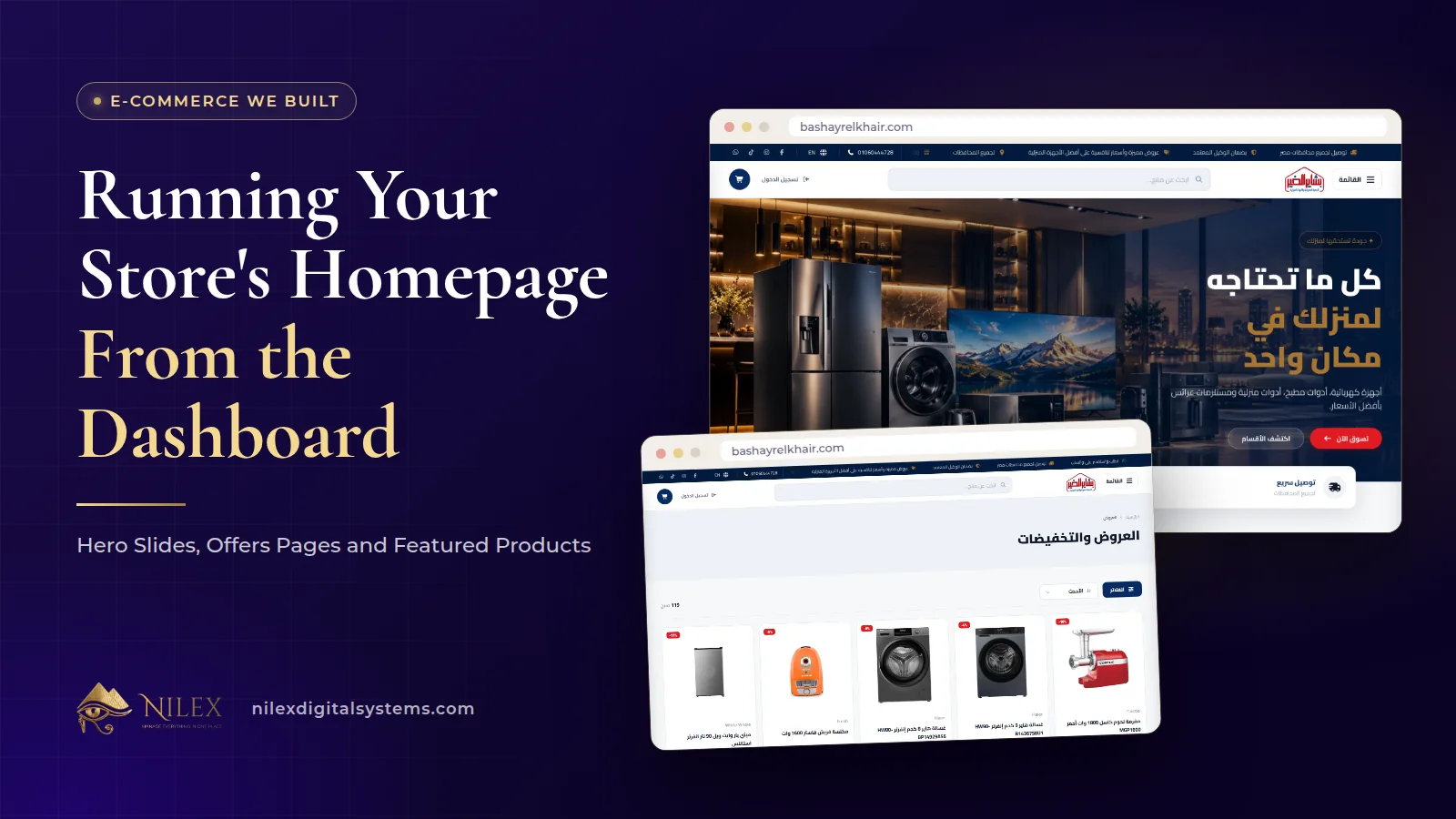
The homepage of an online store should be run by the team that sells, not by a developer. In the stores we built for Bashayer El Khair and Dar El Ahram, the parts that change with the season, such as the hero slides at the top, the current offers and the products in the spotlight, are managed from the dashboard: the team adds a slide, uploads its image, puts the slides in order, creates an offer with its own page, and the storefront updates.
That matters because merchandising is weekly work. A new season, a new shipment or a holiday offer should reach the homepage the same day, not wait for a change request. This article shows what the dashboards of Bashayer El Khair and Dar El Ahram let the team change, and how to use those controls well.
Key takeaways
- At Bashayer El Khair the team creates, edits, reorders and removes hero slides from the dashboard, each with its own uploaded image.
- Offers are created in the dashboard with an image and the products they cover; each offer gets its own page with a countdown, and offers also appear on the shop and category pages.
- Dar El Ahram's team creates offers from the books they include, switches them on and off, and creates coupons that can be announced to customers by email.
- Hiding a book, unpublishing an article or deactivating an offer is reversible; at Bashayer El Khair, permanently deleting a category, brand or article is kept for the admin.
- A short weekly routine keeps the homepage current without a developer.
What does a store's homepage need to do?
Many visitors from Google land on product and category pages, but returning customers, people who type the shop's name and followers who click a link in a post often land on the homepage. For them, it answers three questions in a few seconds: what does this shop sell, what is new or on offer now, and where do I click next.
That is why a store homepage is built from blocks the team can change. At Bashayer El Khair the homepage brings together the hero slides, a rail and showcase of categories, product carousels, the brands the shop carries, a moving text strip and the shop's location on a map. At Dar El Ahram it shows featured books, authors, categories, active offers, upcoming events, recent articles and a newsletter sign-up.
Hero slides: the top of the page
The hero is the large banner at the top. Bashayer El Khair's dashboard has a hero slides screen where the team can:
- create a new slide and upload its image;
- edit an existing slide, or remove it;
- change the order in which the slides appear.
The slide form also loads the store's categories, so a slide can be tied to a section of the catalogue rather than being a picture with nowhere to go.
What makes a slide work
- One message per slide. A season, a category or an offer, not all three.
- A clear destination. Every slide should lead to the category or offer it talks about.
- Few slides. Visitors may never reach the third or fourth slide, so put the most important one first and use the order control.
- Readable on a phone. Keep text on the image short, because many shoppers will see it on a small screen.
Offers with their own pages
At Bashayer El Khair, offers are created in the dashboard: the team gives the offer an image and picks the products it covers from the catalogue. Each offer then appears in three places on the storefront:
- an offers page that lists the current offers;
- an offer detail page with a countdown, in Arabic and English;
- offer cards and bundles on the shop and category pages, also with a countdown.
Because every offer has its own page, it has its own link. A post on social media or a reply on WhatsApp can send the customer straight to that offer rather than to the homepage. When an offer ends, the team can deactivate it, or delete it permanently if it should not come back.
At Dar El Ahram, offers are created from the books they include, can be switched on and off from the dashboard, and active offers appear on the homepage, the books page and an offers page. How to design offers and bundles that protect your margin is covered in timed offers, bundles and countdowns; here we focus on where the controls live.
Coupons and announcing them
Dar El Ahram's dashboard also has a coupons screen: the team creates, edits and deletes coupons, and can send coupon notification emails to customers. The customer enters the coupon in the cart, where it is checked, and signed-in customers can see their valid coupons in their profile. Coupons are useful when an offer should reach a specific group rather than everyone who visits the homepage.
Featured, new and hidden products
Not every merchandising decision is an offer. Some are simply about what is visible:
- Featured books. Dar El Ahram's homepage shows featured books alongside authors and categories.
- Latest releases. Dar El Ahram has a latest releases page, so new titles have a place of their own.
- Show or hide. Each book can be shown or hidden on the public site from the dashboard, and a deleted book can be restored.
- Categories and brands. At Bashayer El Khair the homepage shows categories and brands, both managed in the dashboard with their own images.
For how to organise the categories and brands themselves, see product categories, brands and filters.
Who can change what?
Letting the team run the homepage does not mean everyone can do everything. The table shows how the two dashboards divide the work.
| Homepage element | Bashayer El Khair | Dar El Ahram | Who changes it |
|---|---|---|---|
| Hero slides | Create, edit, reorder, remove | Not used | Admin and staff |
| Offers | Create with image and products; deactivate; permanent delete | Create with books; switch on or off; delete | Admin and staff (Bashayer); admin (Dar El Ahram) |
| Coupons | Not used | Create, edit, delete, email customers | Admin |
| Articles on the site | Write, publish, unpublish | Write and approve posts | Admin and staff; moderators can write posts at Dar El Ahram |
| Categories and brands | Create and edit with images | Create and edit categories | Admin and staff (Bashayer); admin (Dar El Ahram) |
| Permanent deletion of categories, brands, articles | Admin only | Admin | Admin |
The principle: reversible actions such as unpublishing or deactivating can be given to staff; actions that cannot be undone stay with the admin. Roles and the rest of the back office are explained in the online store back office.
A weekly homepage routine
- Check what ended. Deactivate offers that are over and remove slides that point to them.
- Check what is new. New stock or new titles deserve a slide or a place in the new arrivals.
- Pick one lead message. Put it on the first slide and make sure it links to the right page.
- Test on a phone. Open the homepage on a phone in both languages and follow each link.
- Tell your channels. Share the offer page link in your posts and replies.
Common homepage mistakes
- Leaving an expired offer on the first slide, which tells customers nobody is minding the shop.
- Slides with no link, or links to the homepage itself.
- Showing prices inside slide images, which go out of date the moment a price changes. Let the offer and product pages show the price.
- Changing everything at once, so you cannot tell which change helped.
How Nilex helps
We build store dashboards where your team controls the homepage: slides, offers with their own pages, coupons where needed, and clear roles for who can change what. You can:
- See the e-commerce store service and its plans.
- Read the case studies for Bashayer El Khair and Dar El Ahram, or the full Bashayer El Khair store case study.
- Tell us how you run offers today on the contact page.
Frequently asked questions
Do I need a developer to change the homepage banner?
Not at Bashayer El Khair. There the team adds, edits, reorders and removes hero slides from the dashboard and uploads the images themselves.
Can I share a link to a single offer?
Yes. At Bashayer El Khair each offer has its own detail page with a countdown, so you can share its link in posts and messages.
Can my staff delete products or offers?
Staff can make reversible changes, such as deactivating an offer or unpublishing an article. At Bashayer El Khair, permanently deleting a category, brand or article is kept for the admin, so a mistake by one person does not remove it for good.
Should I use a coupon or a public offer?
A public offer is for everyone who visits; a coupon is for a group you choose to tell. Dar El Ahram's dashboard supports both, including emailing coupons to customers.
How many hero slides should I have?
Few. Put the most important message first, keep each slide to one message, and use the order control to move the current priority to the top.
 Starting Online Orders for Your Supermarket: A Practical Launch Plan, Decision by Decision11 October 2026 · 9 min
 Online Legal Bookshop Case Study: How Dar El Ahram Sells 800+ Legal Titles Online11 October 2026 · 11 min
 Selling Online From Egypt to Other Countries: Shipping Prices per Country, Local Zones and Card Payment11 October 2026 · 8 min