
The Roastery Production Calculator: Planning Roasts and Blends From Customer Orders
A weekly production routine for coffee roasteries: start from customer orders, subtract blend stock, size each batch, check every ingredient with the production calculator, and turn shortages into roasting runs and supply orders before the roaster is lit.
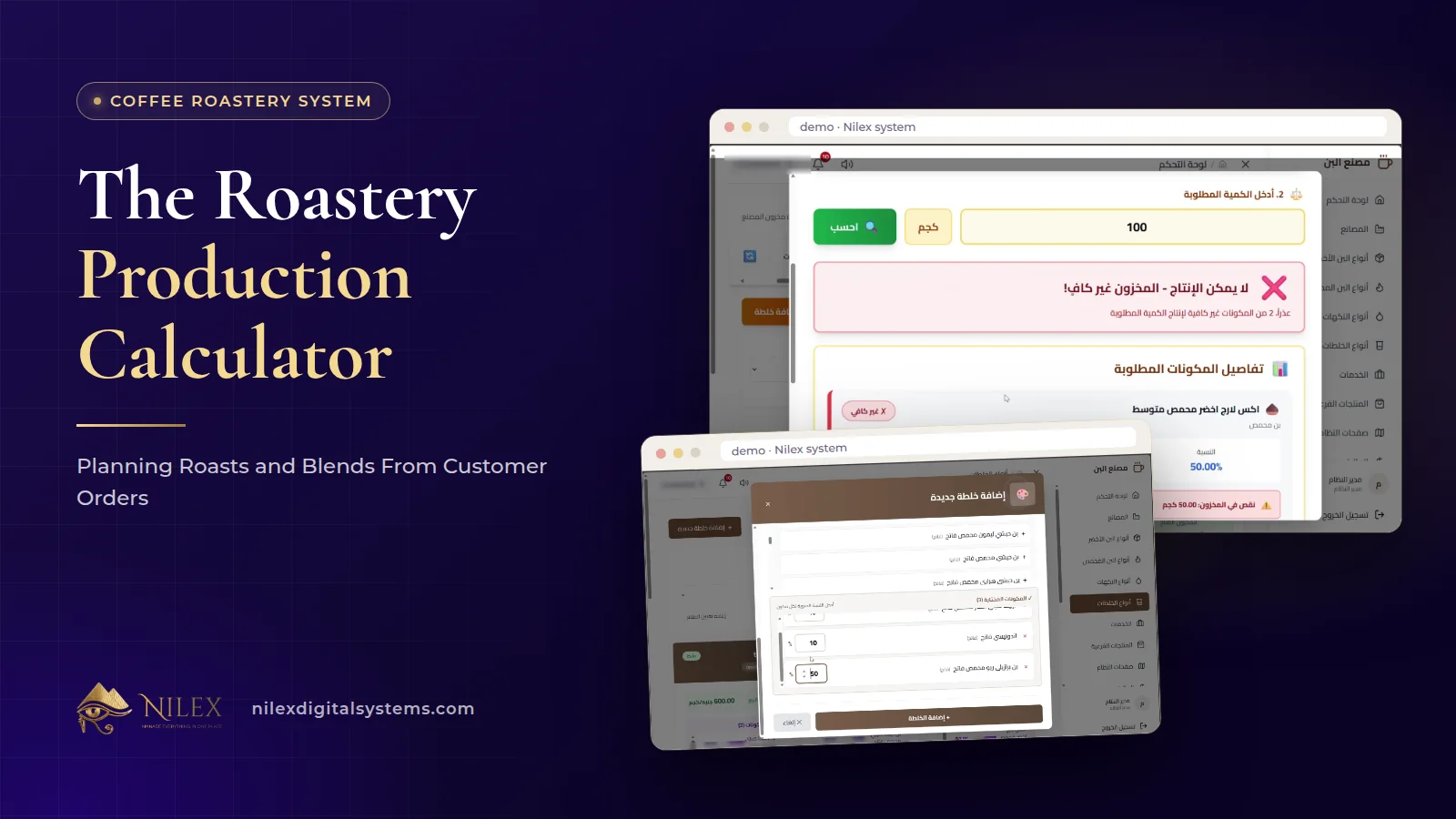
A roastery plans production from customer orders by working backwards: add up what the open orders need of each blend, subtract the blend stock already on the shelf, decide the batch size, then enter that quantity in the production calculator, which shows for every ingredient whether it is in stock and exactly how much is missing. The missing quantities become the roasting plan, and any green coffee you do not have becomes a supply order.
Done this way, production stops being a morning guess by the head roaster and becomes a short routine anyone on the team can follow. It also catches the expensive surprises early: the blend that cannot be finished because one roasted coffee ran out, the flavour nobody reordered, the customer order promised for Thursday that depends on green beans arriving Wednesday. How to write blend recipes and cost them was covered in coffee blend recipes and costing; this article is about the planning routine that uses those recipes every week.
Key takeaways
- Plan from demand: open customer orders minus blend stock gives the quantity of each blend to produce.
- The production calculator checks one planned quantity at a time and shows needed, available and missing for each ingredient.
- When two blends share a roasted coffee, plan them together, because they draw from the same stock.
- Missing roasted coffee becomes a roasting run; missing green coffee, flavours or side products become supply orders.
- Service-only orders on the customer's own coffee use roaster time but none of your stock, so keep them out of the ingredient plan.
Why plan production from customer orders?
Many roasteries produce by habit: the house blend on Sunday, the espresso blend on Tuesday, whatever ran out in between. That works while demand is steady. It breaks when a wholesale customer orders a large quantity of one blend, when a café asks for a special grind, or when a season shifts demand from one blend to another. Producing by habit then means too much of what is not selling and too little of what is promised.
Planning from orders reverses the direction. Customer orders are created in three steps: the customer, the products (green, roasted, blends, flavours, side products or a service only) and a review with the discount, pickup or delivery and the total. Each order carries its status. The open orders for the coming days are therefore the most reliable statement of what you need to produce. Everything else, safety stock and walk-in sales, is added on top as a decision, not a habit.
The planning routine, step by step
- List the open orders due in your planning window, for example the next three or seven days, and add up the quantity of each blend and each roasted coffee sold on its own.
- Remove service-only orders from the ingredient count. Roasting or grinding a customer's own coffee is sold as a service and does not touch your stock, though it still needs roaster or grinder time.
- Check blend stock. Each produced batch entered blend stock with its number and production date. Subtract what is already on the shelf, oldest batches first.
- Decide the batch size for each blend: what is missing, plus whatever buffer you choose to keep for walk-in and phone sales.
- Run the production calculator for each blend with that quantity. It shows every ingredient, the quantity needed, what is available and exactly how much is missing.
- Combine shared ingredients across blends and add any roasted coffee sold on its own.
- Turn shortages into actions: roasting runs for missing roasted coffee, supply orders for missing green coffee, flavours or side products.
- Produce and record each batch so it enters blend stock with its number and production date.
What does the production calculator show, and what does it not?
You enter the quantity of a blend to produce. The calculator reads the blend's recipe, which was only accepted when its percentages totalled 100%, and lists every ingredient, roasted coffees at their roast level and flavours alike, with the quantity needed, what is available and how much is missing. Nothing is produced until you decide to produce it.
Two things are worth being clear about, so the calculator is used well:
- It answers one planned quantity at a time. If the house blend and the espresso blend both use the same medium-roast Brazil, until the first batch is actually produced, both calculations look at the same stock. Plan shared ingredients together, as in the example below, so you do not count the same kilos twice.
- It works from the recipe and the stock you recorded. If roasted coffee was produced but not entered, or a bag was used without being recorded, the calculator will show stock that is not on the shelf. A regular stock count, like the monthly checklist in green coffee stock and roasting loss, keeps the numbers honest.
A week's plan: an illustrative example
Suppose the open orders for the next five days need two blends, and both use medium-roast Brazil. Illustrative example: the blends, quantities and stock are made up to show the method.
| Blend | Ordered | Blend stock | Buffer | To produce |
|---|---|---|---|---|
| House blend (70% Brazil medium, 30% Ethiopia light) | 65 kg | 15 kg | 10 kg | 60 kg |
| Espresso blend (50% Brazil medium, 40% Colombia dark, 10% Robusta dark) | 35 kg | 5 kg | 10 kg | 40 kg |
The calculator for each blend shows what it needs. Putting the two results side by side shows what the week really needs from each roasted coffee:
| Roasted coffee | House blend needs | Espresso blend needs | Total needed | Available | To roast |
|---|---|---|---|---|---|
| Brazil, medium | 42 kg | 20 kg | 62 kg | 45 kg | 17 kg |
| Ethiopia, light | 18 kg | 0 kg | 18 kg | 20 kg | 0 kg |
| Colombia, dark | 0 kg | 16 kg | 16 kg | 10 kg | 6 kg |
| Robusta, dark | 0 kg | 4 kg | 4 kg | 8 kg | 0 kg |
Run separately, each calculation would have shown Brazil as fully available, since 45 kg covers either 42 kg or 20 kg on its own. Together they need 62 kg. That 17 kg gap is exactly the kind of shortage that otherwise appears on Wednesday afternoon, half-way through the second blend.
From shortage to roasting run
A shortage of roasted coffee means a roasting run, and a roasting run needs more green coffee than the roasted weight you want, because beans lose weight in the roaster. Each green coffee type in the system carries its origin and the weight lost at light, medium and dark roast, which is what the system uses when costing roasted coffee. The same percentage tells the roaster how much green to load; the formula and a worked table are in green coffee stock and roasting loss, so we will not repeat them here.
The practical rule for the plan: write the roasting runs in the order the blends will be produced, check the green stock of the factory for each one, and if green coffee is short, raise a supply order before anything else. Supply orders record green coffee, flavours and side products from suppliers by the kilo, with the total calculated.
Do not forget flavours and side products
Recipes can include flavours such as hazelnut, cardamom or chocolate, and the calculator checks them like any other ingredient. Flavours are small quantities, which is exactly why they are forgotten: a blend can be fully roasted and still not be finished because a few kilos of cardamom did not arrive. Side products such as tea, sugar and biscuits are not part of production, but the same open orders tell you what to have ready for dispatch.
A weekly planning rhythm
| When | What to do | Where in the system |
|---|---|---|
| Start of the week | List open orders and add up blend quantities | Customer orders and their status |
| Same day | Subtract blend stock and set batch sizes | Blend stock with batch numbers and dates |
| Same day | Check each blend and combine shared ingredients | Production calculator |
| Before roasting | Raise supply orders for missing green coffee and flavours | Supply orders |
| Each production day | Produce batches and record them | Blend stock |
| Mid-week | Re-check new orders and adjust the plan | Customer orders, production calculator |
| End of the week | Count stock and compare expected and actual cost | Stock and the expected and actual cost of each item |
Orders that include roasting, grinding, packing, premium wrapping or express delivery add work after production. How those services are priced on each order, and how service-only orders on a customer's own coffee are handled, is covered in coffee orders with roasting and grinding services.
How Nilex helps
The coffee roastery and factory management system includes blend recipes by percentage that must total 100%, the production calculator that shows each ingredient's needed, available and missing quantity, blend stock with batch numbers and production dates, green coffee types with roasting loss per roast level, customer orders in three steps with services and service-only orders, returns, and supply orders by the kilo. Blend recipes and the production calculator are part of the One Roastery plan, so they are in every plan on the system page.
We set the system up with your coffee types, blends, services and prices and train your team before go-live. The plans, demo videos and the request form are on the system page. For the full picture of what a roastery system must track, read coffee roastery management system; if you run more than one site, see running several coffee factories from one system. Questions? Contact us.
Frequently asked questions
Does the system build the production plan from orders automatically?
No. You decide the quantity to produce from your open orders and stock, and the production calculator checks every ingredient for that quantity and shows what is missing.
What if two blends use the same roasted coffee?
Until the first batch is produced, both calculations look at the same stock, so add the needs of both blends together before deciding how much to roast, as in the example above.
Does the calculator tell me how much green coffee to roast?
The calculator shows missing quantities of the recipe's ingredients. The roasting loss recorded for each green coffee and roast level lets you work out the green weight to load, using the method in our roasting loss guide.
Are flavours checked too?
Yes. Flavours that are part of a recipe are listed with the quantity needed, available and missing, like the roasted coffees.
Which plans include the production calculator?
Blend recipes and the production calculator are in the One Roastery plan, and the larger plans include everything in it.
 Running Several Coffee Factories or Roasteries From One System: Factory Dashboard and Stock per Site11 October 2026 · 8 min
 Sales Rep Portal and Online Requests From Shops: How Distributors Take Orders Without Paper11 October 2026 · 10 min
 Dashboard Alerts and Sales Reports for Distributors: Low Stock, Open Balances and Top Customers11 October 2026 · 9 min