Arabic and English in One Business System: What Real Bilingual Software Looks Like
Bilingual software is more than a translated menu. The five layers to check, from right-to-left screens and two-language content to PDFs, /ar and /en pages for Google and AI assistants that understand Egyptian Arabic and Franco, with examples from Nilex work.
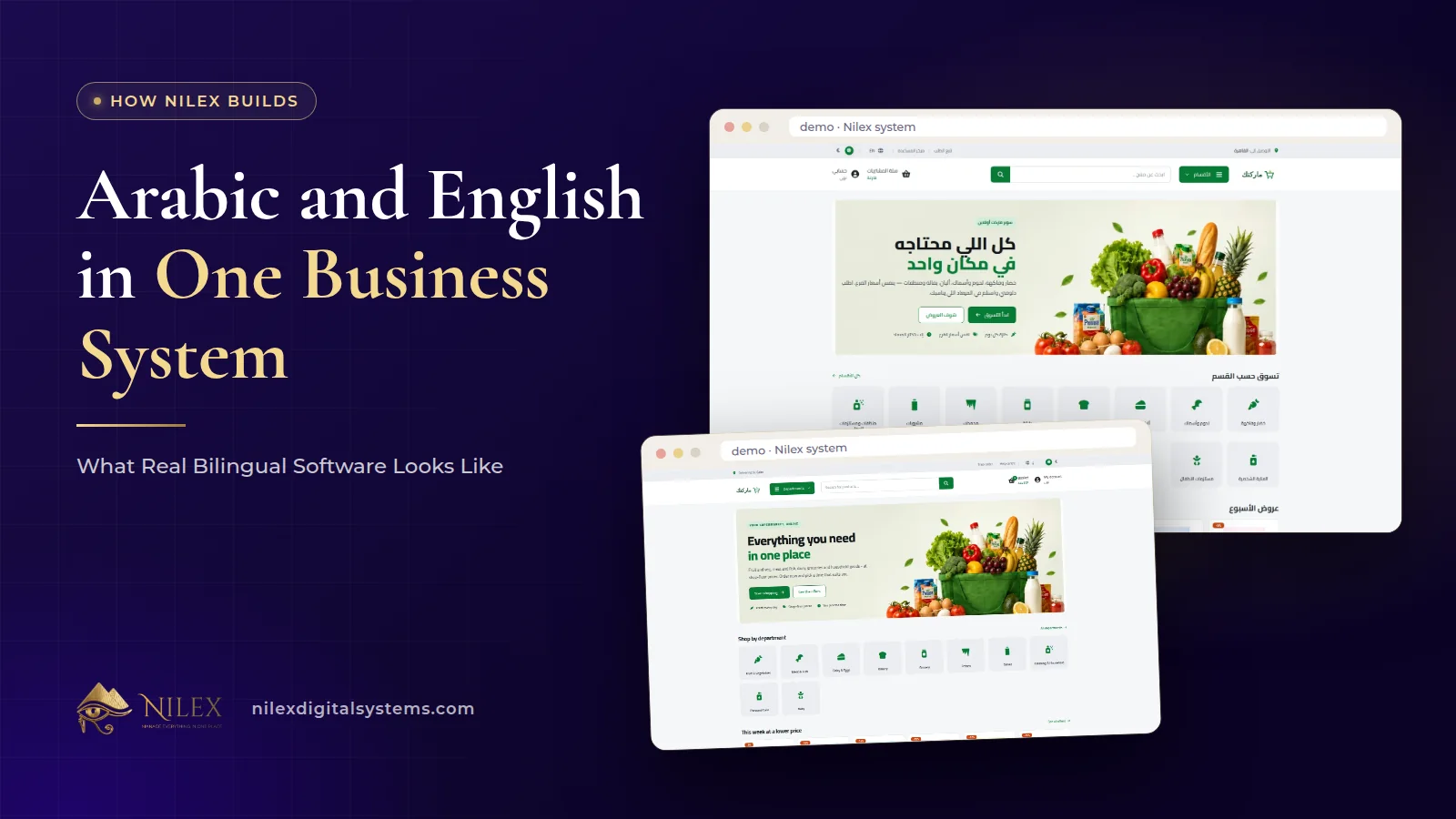
A business system is truly bilingual when your team can work in Arabic or English on every screen, the Arabic screens read right to left properly, the data itself (product names, articles, services) can be held in both languages, the documents you print come out correctly in either language, and any public pages exist in both languages so Google can show each one to the right searcher.
Many systems in the Egyptian market are "bilingual" only in the menu: switch to Arabic and half the labels stay in English, reports print with broken Arabic letters, and product names exist in one language only. For a company with an Arabic-speaking team, English-speaking managers or partners, and customers who expect Arabic invoices, that gap shows up every day. Here is what to check, layer by layer, with examples from the systems and stores we build at Nilex.
Key takeaways
- Check five layers: the interface, the content fields, printed documents, public pages for Google, and any AI assistant.
- Every Nilex system works in Arabic and English; look for both languages in one system, not a separate Arabic copy.
- Documents matter most to customers: check-in forms, warranties, invoices, statements and reports must print cleanly in Arabic.
- For websites and stores, Arabic and English pages need their own addresses, such as /ar/ and /en/, so each can be found on Google.
- An AI assistant for Egyptian customers must understand how Egyptians actually write: Egyptian Arabic, Franco and English.
The five layers of a bilingual system
| Layer | What to check | Example from Nilex work |
|---|---|---|
| 1. Interface | Every screen, menu and message in both languages; Arabic laid out right to left | Every Nilex system works in Arabic and English, on any device |
| 2. Content | Records that customers see can be stored in both languages | Supermarket products have Arabic and English names; the Al Hasswa article editor publishes in both |
| 3. Documents | PDFs and printouts correct in Arabic, with your logo | Car protection check-in forms, warranties and reports print in either language |
| 4. Public pages | Separate Arabic and English pages that Google can index | Anas Saleh Coffee and Bashayer El Khair stores at /ar/... and /en/... |
| 5. Conversation | Assistants and chat that understand local Arabic | Coffee expert that talks in Egyptian Arabic, Franco or English |
Layer 1: The interface, right to left
The basic test is simple: switch to Arabic and open every screen. Menus, buttons, table headers, error messages and empty states should all be in Arabic, and the whole layout should mirror to read right to left, with tables, forms and side menus on the side an Arabic reader expects. Switching back to English should mirror it again.
Every Nilex system works in Arabic and English. The wholesale distribution system, for example, works in Arabic and English throughout, including statements and reports, and the car protection system works in both on computers, tablets and phones. In the Anas Saleh Coffee and Bashayer El Khair stores, the admin dashboard has its own language switcher, so the owner and staff can each manage the store in the language they prefer.
Why it matters: in many Egyptian companies the warehouse team, technicians and cashiers work most comfortably in Arabic, while a manager, a partner or an accountant may prefer English. One system that works in both languages keeps everyone on the same data instead of two parallel sheets.
Layer 2: Content in both languages
Translating the interface is the developer's job. Translating your data is not automatic: a product called "طماطم" needs an English name someone writes. A good system gives you the fields to hold both versions, so each language shows the right one.
- In the online supermarket system, products have Arabic and English names alongside barcode, brand and unit.
- The Al Hasswa Law Firm project includes an article editor so the firm publishes its own legal content in Arabic and English.
- The real estate developer system's company website shows available units, projects and articles in Arabic and English.
Plan the work: decide who writes the English (or Arabic) version of product names, service names and articles, and whether both are required before a record goes live. That is a business decision, not a technical one.
Layer 3: Documents your customers receive
Printed and PDF documents are where weak Arabic support is most visible: disconnected letters, reversed numbers, or a table that runs the wrong way. Customers notice it immediately on an invoice or a warranty.
In the car protection centers system, the check-in form the customer signs, the warranty certificates and the ready reports (monthly operations, staff salaries and a comprehensive financial report) print in Arabic or English. In the car repair system, estimates, job cards and invoices print as Arabic PDFs. When you evaluate any system, print a real document with a long Arabic customer name, a mixed Arabic and English product name and a model code, and read it as your customer would. For more on documents, see PDF documents from your business system.
Layer 4: Public pages Google can find in each language
When the system has a public side, a website, a store or a booking page, bilingual means each language has its own pages at their own addresses. A visitor searching in Arabic should land on the Arabic page, and one searching in English on the English one.
The stores we built for Anas Saleh Coffee and Bashayer El Khair follow this pattern: public pages exist in Arabic and English at /ar/... and /en/..., and the home address opens the Arabic store first. Anas Saleh Coffee is an Arabic-first store with 98 products online; Bashayer El Khair has 400+ products and 38 brands with their own pages, in both languages. The technical side of serving two languages to Google is covered in bilingual websites for Egypt and the Gulf, and the store side in a bilingual Arabic and English online store.
Layer 5: Assistants that understand how Egyptians write
Egyptian customers do not type in textbook Arabic. They write in Egyptian Arabic, in Franco (Arabic in Latin letters), in English, or a mix of all three in one message. An assistant that only understands formal Arabic or only English will miss most of them.
- The coffee expert on the Anas Saleh Coffee store talks with customers in Egyptian Arabic, Franco or English, and its knowledge base includes the words Egyptians use to describe coffee. A request like «تقيلة ووشها كتير ومش مُرّة، بطعم شوكولاتة» becomes a Turkish blend with exact bean percentages. The full story is in the AI coffee blend assistant case study.
- The shopping assistant on the Bashayer El Khair store is spoken to in Egyptian Arabic, the way a customer would talk to a salesman, and sizes air conditioners and fridges before recommending.
- The Dar El Ahram book assistant answers a reader's legal question with the books that fit and why.
For assistants on WhatsApp and other channels, read a WhatsApp chatbot that understands Egyptian Arabic.
How we show it before you buy
Every system page on our site has demo videos with Arabic captions, 20 screenshots, the modules, the plans and the FAQs, so you can see the screens before talking to anyone. This website itself has every article in English and Arabic, and the system pages at /systems and /ar/systems.
A 10-minute bilingual test for any system
- Switch the language and open five screens you would use daily. Is anything left untranslated?
- Check that the Arabic layout reads right to left, including tables and forms.
- Create a record with a long Arabic name and a model code with Latin letters and numbers.
- Print an invoice or statement in Arabic and in English.
- Ask whether customer-facing content has fields for both languages.
- If there is a public website or store, open the Arabic and English versions of the same page and check their addresses.
- If there is an assistant, write to it in Egyptian Arabic and in Franco.
The broader list of standards a professional system should meet is in what makes a business system professional.
How Nilex helps
- Ready systems: watch the demo videos on our systems page and send the request form on the system that fits you. Every system is set up in Arabic and English around your way of working.
- Stores and websites: our e-commerce store service and SEO business website service build bilingual public pages, as in the Anas Saleh Coffee and Bashayer El Khair stores.
- Assistants: our AI business chatbot service works in Arabic and English.
- Or contact us with your case.
Frequently asked questions
Is the Arabic version a separate system?
No. Every Nilex system works in Arabic and English, so Arabic is part of the same system your team uses, not a second system.
Who translates our product names and content?
The system gives you fields for both languages where customers see the content, such as product names in the supermarket system. Your team decides and writes the wording; the interface itself already comes in both languages.
Will invoices and reports print correctly in Arabic?
Check the documents of each system on its page. For example, car protection check-in forms, warranties and reports print in Arabic or English, and car repair estimates, job cards and invoices print as Arabic PDFs.
Do the Arabic and English pages of our store rank separately on Google?
Each language has its own pages at /ar/... and /en/..., which gives Google a separate page to index in each language. Ranking still depends on content and competition.
Can a chatbot understand Franco?
It can be built to. The coffee expert on the Anas Saleh Coffee store talks in Egyptian Arabic, Franco or English.